
SpeedTop VPN: Fast & Secure
SOON BODYWERKZTools
4.3770.00 Reviews
- Version
- 1.1.7
- Installs
- 10.00M
- Age Rating
- Everyone
Screenshots
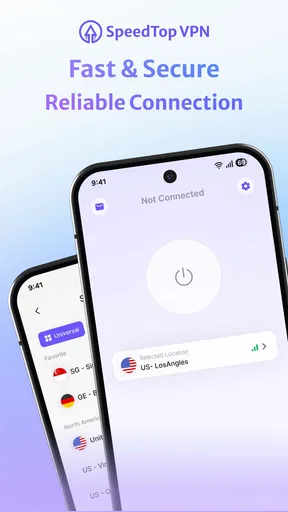
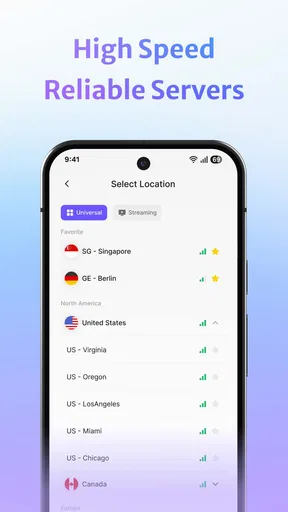
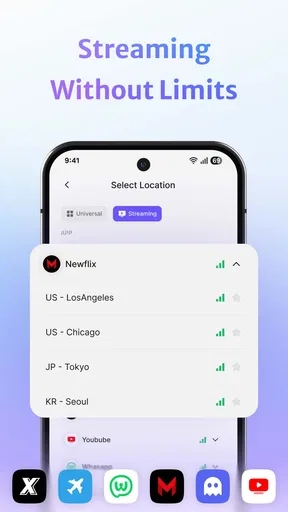
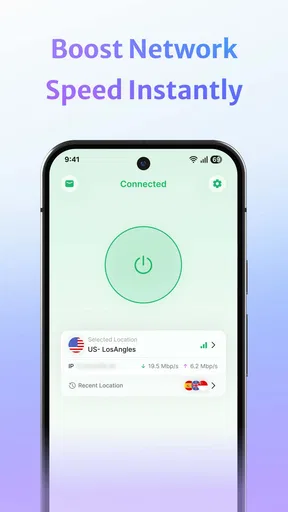
Our Review of SpeedTop VPN: Fast & Secure
 Analysis by Appyee
SpeedTop VPN: Fast & Secure is the kind of tools app I would reach for when a connection feels unreliable and I want a simpler way to protect my traffic. Its main appeal is easy to understand: it aims to provide a fast VPN connection even on weak networks, while keeping privacy in mind. After spending time with it, my view is that it works best as a straightforward everyday option rather than as a highly configurable service for people who want to control every technical detail.
That distinction matters. A VPN can be useful for more than hiding an IP address. I use one when connecting to public Wi-Fi, when a mobile signal keeps changing, or when I want an extra layer between my device and the network I am using. SpeedTop VPN focuses on reducing the effort involved in those moments. The app is free to install, has an Everyone age rating, and comes from SOON BODYWERKZ. Its current version is 1.1.7, and it runs on Android 7.0 or later.
My overall conclusion is simple: SpeedTop VPN is a practical choice for casual protection and difficult network conditions, but users who need advanced server controls, detailed privacy documentation, or a specialized streaming experience should compare it carefully with more established alternatives before settling on it.
What using SpeedTop VPN feels like in daily life
The first thing I noticed is that the app is designed around a quick decision: connect or do not connect. That is helpful when I am leaving home, joining café Wi-Fi, or trying to get online from a place where the signal is inconsistent. Instead of treating a VPN like a project that needs constant adjustment, SpeedTop VPN presents it as a tool I can turn on when the situation calls for it.
A realistic example is working from a coffee shop while waiting for an appointment. I might need to check email, use a cloud service, or send a document over public Wi-Fi. In that situation, I am less interested in experimenting with connection settings than in getting a stable tunnel active before I start. SpeedTop VPN fits that habit. I can connect first, then use the phone normally without making the VPN itself the center of the experience.
The weak-network focus is also meaningful. Many VPNs feel acceptable on a strong home connection but become frustrating when the underlying signal is already poor. A VPN cannot create bandwidth that is not there, so I would not expect miracles from any app in this category. What matters is whether the service remains usable instead of turning a slow connection into an unusable one. SpeedTop VPN is most interesting for people who regularly move between Wi-Fi and mobile data, travel through areas with uneven coverage, or use older devices.
That does not mean every connection will be equally quick. Distance to a server, local congestion, the quality of the mobile network, and the activity being performed all affect the result. I would judge this app by whether it keeps ordinary browsing and basic app use comfortable, not by expecting a VPN connection to match an unprotected one in every situation.
Privacy without turning the app into a technical lesson
For many people, the privacy benefit of a VPN is easier to appreciate than the technical explanation behind it. SpeedTop VPN is positioned as a way to keep personal activity safer while using networks that may not deserve complete trust. I find that useful for routine tasks such as reading messages, checking an account, or browsing while away from a private connection.
Still, I would not confuse a VPN with complete anonymity. It can help protect traffic between the device and the VPN service, but it does not make careless passwords safe, remove tracking from every app, or prevent a user from sharing personal information voluntarily. I would still use strong, unique passwords, keep Android updated, and avoid entering sensitive information into suspicious pages.
This is one of the most important practical lessons with SpeedTop VPN: activate it before connecting to an unfamiliar network, not after beginning the activity you wanted to protect. If I join public Wi-Fi first, open a browser, and only then remember to start the VPN, I have already spent time exposed to that network without the extra layer. Making the connection part of my routine is more valuable than treating it as an emergency button.
I also prefer to switch it on selectively. At home, where I trust my own network and need the best possible speed for local devices, I may not need the VPN constantly. When I am on public Wi-Fi or using a network I do not control, the balance changes. That habit helps reduce unnecessary slowdowns and makes it easier to notice when a VPN connection affects an app that depends on a particular network path.
Where the weak-network promise helps, and where it cannot
The strongest reason to try SpeedTop VPN is its emphasis on unreliable connections. A service that remains usable on a weak network can be more valuable than one that looks impressive only under ideal conditions. For someone commuting, traveling, or living with inconsistent mobile coverage, this focus is more relevant than a long list of advanced settings.
There is a trade-off, though. A VPN has to route data through another service, so some loss of speed or extra delay is normal. This becomes easier to notice during video calls, online games, large downloads, or other activities that depend on low latency. If I am trying to join an important meeting from a weak signal, I would test the connection before the meeting begins rather than assume that the VPN will solve the underlying problem.
My practical approach would be to connect SpeedTop VPN, open the service I need, and give it a short real-world test. If pages load normally and messages send without repeated delays, I would keep it active. If a particular app becomes unstable, I would disconnect briefly to identify whether the VPN is involved. This simple comparison is more useful than judging the service from a single moment when the mobile network itself is struggling.
Another useful tip is to avoid changing several things at once. If a connection is poor, I would first check whether the phone has a stable signal, then try the VPN, then compare the result. That makes it easier to tell whether SpeedTop VPN is helping. A VPN can improve privacy and sometimes provide a better route, but it cannot repair a damaged router, a congested tower, or a service outage.
How it compares with ordinary VPN alternatives
Compared with a typical free VPN, SpeedTop VPN’s clearest advantage is its direct focus on fast access over weak networks. Many free tools can feel cluttered with distractions or make the user work through several choices before connecting. SpeedTop VPN is more appealing if I want a quick, uncomplicated layer of protection and do not want to study VPN terminology.
Compared with a premium VPN aimed at experienced users, the appeal is different. More specialized services often attract people who want fine control over locations, protocols, privacy settings, or connection behavior. SpeedTop VPN is better suited to someone who values convenience over configuration. If I were selecting a VPN for professional travel, sensitive work, or a carefully managed privacy setup, I would look closely at the provider’s documentation and controls before choosing a simpler app.
It is also important not to treat all VPNs as interchangeable. A person mainly concerned with public Wi-Fi safety has a different need from someone trying to access a particular regional service, maintain a stable gaming connection, or manage several devices. SpeedTop VPN makes the most sense in the first group and among users whose biggest frustration is an unreliable network.
The free price lowers the barrier to testing it. However, the app includes in-app purchases ranging from $1.29 to $9.99 per item, so I would pay attention to what is included before spending money. A free starting point is useful, but the value of any optional purchase depends on whether it addresses a problem I actually have. I would not pay simply because a faster or more private-sounding label appears in an upgrade screen.
Small habits that make the app more useful
My first recommendation is to make a short connection checklist. Before using unfamiliar Wi-Fi, I would connect to SpeedTop VPN, confirm that the phone still has internet access, and then open the app or website I need. This avoids the common mistake of assuming that a VPN is active when it has quietly disconnected or has not been started yet.
My second recommendation is to test important services in advance. Banking apps, work tools, delivery services, and streaming platforms can react differently to VPN traffic. If one of them fails to load, I would not immediately conclude that SpeedTop VPN is broken. I would disconnect once, retry, and decide whether that service works better without the VPN. The right choice can vary by task.
My third recommendation is to use the app as part of a broader privacy routine. I would combine it with screen locking, system updates, cautious permissions, and secure account practices. The VPN is most useful when it protects the network connection without encouraging false confidence about everything else happening on the phone.
A fourth trade-off is battery and convenience. Keeping any network service active continuously may be less attractive than using it only when needed, especially on an older phone or during a long day away from a charger. If battery life matters more than constant coverage, I would activate SpeedTop VPN for public networks and turn it off when I return to a trusted connection.
Who should use it and who should look elsewhere
I would recommend SpeedTop VPN to Android users who want a free, approachable VPN for everyday situations. It is particularly suitable for people who use public Wi-Fi, move between inconsistent networks, or find advanced VPN interfaces intimidating. The Everyone rating also makes it easy to consider for a broad household audience, although younger users should still understand that a VPN does not replace sensible online behavior.
The app’s popularity suggests that it has reached a substantial audience: it carries a 4.4 average from around 151 thousand ratings and has passed 10 million installs. Those figures make it easier for me to view the app as a commonly used tool rather than an obscure experiment, but they do not remove the need to decide whether its approach fits my own needs.
I would be more cautious about recommending it to someone who needs a VPN for demanding professional work. If I needed predictable performance for frequent video conferences, precise location selection, or a detailed privacy setup, I would compare services built specifically around those requirements. The same applies to users who want to manage a VPN across multiple platforms or who expect extensive technical explanations before trusting a provider.
I would also skip it if my main goal were to fix a genuinely bad internet connection. SpeedTop VPN may help make a weak network more usable in some situations, but it cannot replace a better router, stronger mobile coverage, or a more reliable internet plan. That limitation is not a flaw unique to this app; it is simply an important boundary for any VPN.
My final view after weighing the trade-offs
SpeedTop VPN: Fast & Secure succeeds because it concentrates on a problem many casual users actually have: staying connected with an extra layer of privacy when the network is not ideal. I like that its purpose is easy to understand and that the free entry point lets me evaluate it without committing first. For public Wi-Fi, travel, and ordinary browsing, it can be a sensible companion.
Its limitations are just as important. A VPN cannot guarantee perfect speed, solve every weak-signal problem, or provide complete anonymity. Users with demanding performance requirements or a need for advanced controls may find a more specialized alternative better suited to them. I would also test essential apps individually, because convenience and compatibility can vary depending on what I am doing.
SOON BODYWERKZ has made a tools app that is easiest to recommend when the priority is quick, uncomplicated protection rather than deep customization. With its current version 1.1.7 and support for Android 7.0 and later, it remains accessible to many Android users. If your usual VPN need is “protect me on this unfamiliar or unreliable network right now,” SpeedTop VPN is worth trying; if your need is a carefully engineered professional privacy system, keep comparing.
Verdict
Strengths of SpeedTop VPN: Fast & Secure
- Simple interface makes connecting to a server quick.
- Offers encryption to help protect data on public Wi‑Fi.
- Useful for accessing region-restricted websites and services.
- Connection status is clearly visible while the VPN is active.
- Suitable for occasional browsing without a complicated setup.
Limitations of SpeedTop VPN: Fast & Secure
- Free servers may become crowded during peak usage times.
- Connection speeds can vary depending on server location.
- Some advanced privacy tools may require a paid plan.
- The app may request permissions users should review carefully.
- VPN use can increase battery consumption during extended sessions.
Other Releases by SOON BODYWERKZ
View All
JumpJumpVPN: Fast & Secure
Tools4.3
Similar Picks in This Category
View All
Google LLC4.0

Gboard - the Google Keyboard
Google LLC4.5

Google Play services
Google LLC4.3

Google Play Store
Google LLC4.9

Files by Google
Google LLC4.5

SHAREit: Transfer, Share Files
Smart Media4U Technology Pte.Ltd.4.3
Frequently Asked Questions
What is SpeedTop VPN: Fast & Secure, and what does it do?
SpeedTop VPN: Fast & Secure is a virtual private network app designed to create an encrypted connection between your device and the internet. It can help protect data when using public Wi-Fi, hide your visible IP address, and provide access to servers in different locations. However, it should not be treated as complete anonymity or a replacement for safe browsing habits.
Is SpeedTop VPN: Fast & Secure free to use?
SpeedTop VPN: Fast & Secure may offer a free way to connect, although availability, server access, advertisements, speed limits, and premium features can depend on the current version of the app. Before activating a subscription, users should carefully review the pricing page, billing period, free-trial conditions, and cancellation policy because VPN services commonly place advanced locations or unlimited usage behind paid plans.
Does SpeedTop VPN: Fast & Secure protect my personal information?
A VPN encrypts traffic between your device and the VPN server, which can make it more difficult for people on the same network to intercept your connection. Nevertheless, the VPN provider may still process certain technical information, and protection can vary by protocol, app permissions, and website security. Read SpeedTop VPN’s privacy policy and avoid entering sensitive information on suspicious websites.
Can SpeedTop VPN: Fast & Secure unblock streaming services or websites?
SpeedTop VPN: Fast & Secure may allow users to connect through servers in other regions, which can help with location-based access in some situations. Streaming platforms frequently detect and block VPN addresses, however, so reliable access is not guaranteed. Performance also depends on server load, distance, your internet connection, and the particular service you are trying to use.
Is SpeedTop VPN: Fast & Secure safe and easy to use on Android or iPhone?
The app is generally intended to provide a simple connection process: install it from the official store, open it, select a server if available, and approve the system VPN request. Users should download only the legitimate listing, check the developer name, permissions, ratings, and recent reviews, and keep the app updated. Remember that a VPN can reduce speed or affect battery life while active.
